
IMG Customization
IMG Customization
Overview
- This page provides details on the IMG customization for estricting classification maintenance by authorization..
- This IMG customization allows a user to make changes to a class of the corresponding Record Type — as maintained here — even without holding the
/XCM/CRCLauthorization object.
Configuration steps
- Open the IMG path:
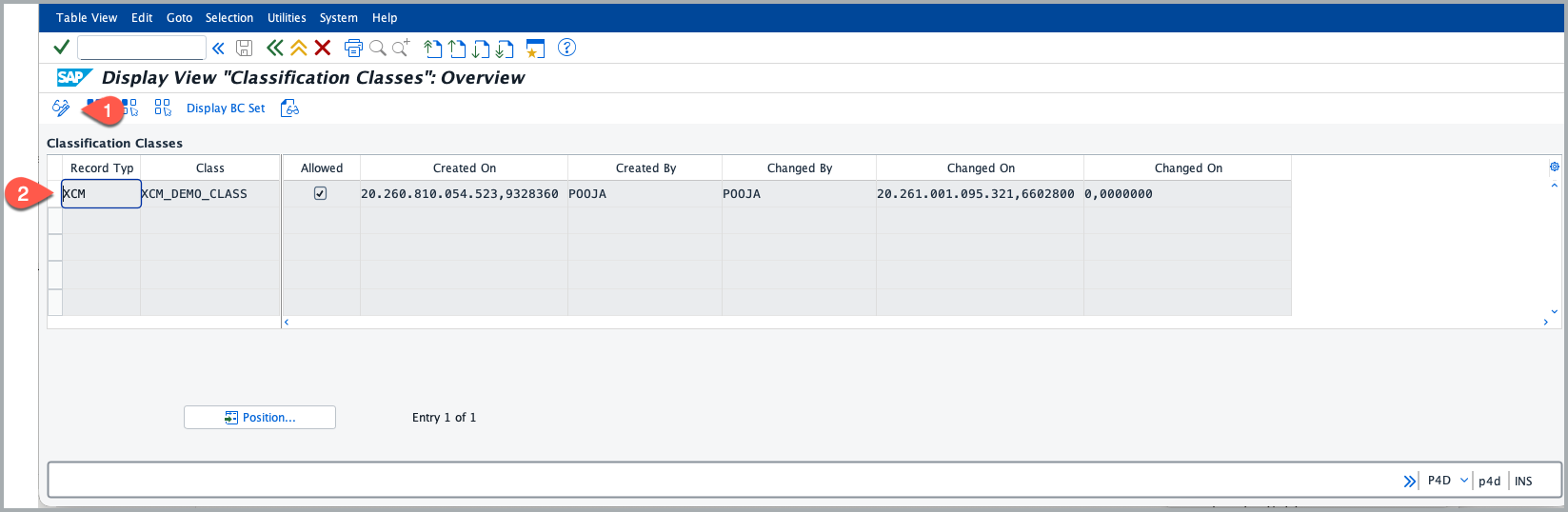
/n/XCM/CUS→ PLM-XCM Customizing → Standard PLM Customizing → XCM Customizing → Change Record Additional Function → Register Class Allowed per Record Type. - Switch to change mode and choose New Entries to add a row
- Enter the Record Type (e.g. XCM) and the Class (e.g.
XCM_DEMO_CLASS) you want to permit to the user who doesn’t have authority object/XCM/CRCL. You can add more than one allowed class for the record type, as needed. - Check the Allowed flag for that row.
- click on save.
See Also
Set default characteristic values and restrict maintenance by authorization
BRF+ Customization
Keywords
Classification classes, Authority Object