
2026.8 - Safer Editing, Tables That Remember, and Configuration Without Code
With release 2026.8, sophisTex PPM Process Package (PPP) focuses on the hours you spend working inside the application. Unsaved changes are now listed one by one and can be taken back individually, so a wrong edit costs you that edit and nothing else. Lists and tables share one foundation across every screen and every device — and they remember how you left them. Three decisions that used to require development move into BRF+, where an administrator can make them. And the upgrade itself gets quieter: customer BRF+ adjustments now run automatically.
Take Back a Single Change, Not All of Them
Every way out of Details now guards your unsaved changes — the breadcrumbs, navigation to another entity, and switching back to display mode alike.
Instead of a general warning, the prompt now lists each pending change individually — the field, the value it held, and the value it holds now — and every row carries its own Undo and Redo. You can reverse one mistaken edit instead of choosing between saving everything and abandoning everything, and no path through the dialog discards your changes. The list covers every tab of the open entity, and consecutive edits of the same field collapse into one step.
Two related improvements make corrections easier. Errors raised while saving now appear in the message area of the screen itself instead of a dialog you had to dismiss first, so you can correct the field without losing sight of the record. And all seven status dialogs now confirm themselves: they stay busy while the change is applied, close on their own, and a message confirms the result. A failing step now reports its failure rather than claiming success, and on items, buckets, portfolios, reviews, initiatives and decision points a refused change leaves the dialog open to retry from.
A Detail Pane for Project Documents
The Documents tab introduced with release 2026.4 brought project files and links together in one hierarchical place. This release makes that content editable right where you read it: selecting a folder or a document opens a detail pane beside the tree, holding the node’s own fields — name, description, change history — ready to edit without a separate dialog.

Behind the pane, documents now stand on the same entity foundation as the rest of PPP, the tree joins the shared table family described next, and document upload was corrected in the same work.
One Table Family on Every Device — and It Remembers You
Each screen used to bring its own table, and what worked on a desktop did not always survive on a phone. PPP’s lists are now built from one family of column-controlled tables that renders as a grid table on the desktop and as a responsive table on a phone. Staffing, documents and object links moved onto it in this release and now share one filter bar, one variant handling and one column selection.
And your lists now remember you. Column state is kept automatically, so a list opens the way you left it — no saved variant required. Table preferences — row count, selection mode, alternating row colors, column order — are held once per table type and applied everywhere it appears, and documents, staffing and object links open with the filter bar collapsed to give the data more room.
Staffing and Approvals on Any Device
Staffing Management is where you feel this first: its table moved onto the shared family, so it now works on a phone and personalizes like every other list. The resource name column returned and the editing controls in matched columns were restored. Three defects that cost real work were fixed with it: a row now shows when it is saving and when it holds unread changes, a staffing assignment the service refuses can be retried instead of leaving the row stuck, and saving removes every draft row rather than two out of three.
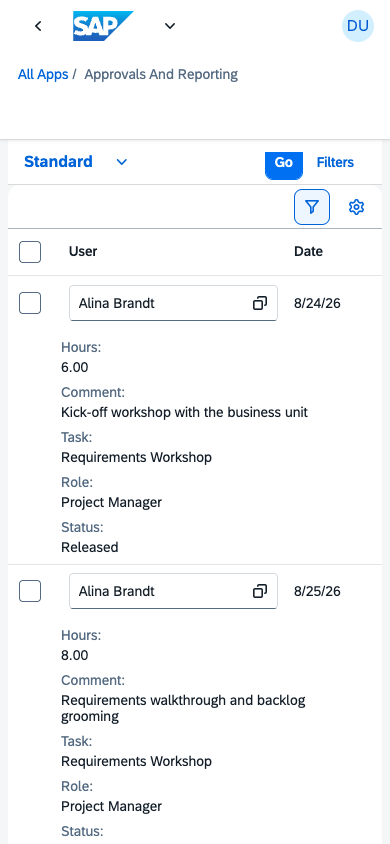
Approving submitted hours used to mean opening each record in turn. The approvals and reporting screen now lets you approve, reject or reopen a record by swiping it, so a list of submissions can be cleared directly — particularly on a tablet. At phone width, each submission is a single row of the responsive table — the row you swipe.
Opening and Filtering a Deep Project Structure
Both structure trees gained Expand All and Collapse All, so a large project hierarchy opens or folds in a single action instead of level by level. Filtering was consolidated at the same time: the tree is filtered through its filter bar alone — the bar starts collapsed, opens from the toolbar’s filter toggle, and its value helps offer what occurs in this project rather than everything in the system.

Customized column labels now reach the filter bar too, and a new setting controls which structural actions a tree offers. Filtering was also made correct end to end: the bar had been opening with no criteria offered; it now presents the filterable fields of the screen, here and on every table that carries one. And the translation of a filter into a database selection was rebuilt, so a range with a lower and an upper bound is treated as one range: a filtered date or number range returns exactly the rows you asked for.
Scrolling the structure also became substantially cheaper, most noticeably in tree mode, and the native Gantt chart previewed in 2026.4 appears faster the first time it is opened. This time the effect is measured, not estimated: PPP now carries a performance baseline for the structure tree.
Value Helps That Fit the Screen Behind Them
The dialogs for picking a portfolio, a business partner, a status or a classification were slow to open and did not always fit the screen behind them. Value helps are now scoped by the entity actually being displayed, so a tab offers the values that belong to it, and descriptions resolve only when they are needed. Smaller corrections came with it: the dialog stays put while only its table scrolls, a key the service cannot resolve is asked for once rather than on every scroll pass, and severity search help on the backend was corrected and sped up.
A Creation Wizard You Can Step Back Through
PPP’s creation wizard is driven by the backend — the service decides what each step asks and which follows, so the sequence is configuration rather than code — but it could not let you return to an answer already given: an early mistake meant starting over. The wizard now supports backward navigation, and it closes with a summary of everything you entered before the entity is created. Previous Step takes you back to correct an answer, and the step you return to still holds what you put in it.

Creating a project from a template was corrected in the same area: it could fail in PPP with an authorization error while the same action succeeded in classic PPM. PPP now creates the project the way the classic application does, so both behave consistently for the same user and template.
Configuration Without Code
Three decisions that previously required a development change are now configuration an administrator makes in BRF+.
Action buttons are under your control. PPP’s standard action buttons — create, delete, copy, paste, export, approve — were fixed in the application, so hiding one meant a development change. A maintainable catalog of hideable buttons now ships with English and German descriptions, and whether a button is offered is decided per button and per object through BRF+. Withdrawing an action your users should not have is now a configuration task, with no release involved.
Rules can change field values by themselves. Keeping one field consistent with another — clearing a value when a status moves on, copying a value across, stamping who last touched a record — used to mean a development change for every rule. PPP now evaluates such rules itself each time the data on an entity changes. A rule is pure configuration: a trigger expressed in your own added fields, conditions written as named field filters you can reuse across rules, and the assignments it then makes — a fixed value, another field’s value, or one derived at the moment it applies, such as the current user, the current date or time, or the associated business partner. Rules react to the values being entered, not only to what was last saved; portfolios, buckets, reviews and checklist templates all run them today.
New entities can start out filled in. What a new entity starts out holding is now maintained per entity type — a list of fields and the value each receives on creation, using the same vocabulary as the rules above. The defaults also reach the child entities created alongside it, so a structure created in one action starts out consistent throughout.
A Quieter Upgrade
Nearly every PPP release so far has carried a post-update step: your own BRF+ application had to be adjusted by hand after the import — easy to forget and easy to get wrong. Those adjustments are now performed automatically, including the migrations this release itself requires, cleanup of the customer application and creation of the customer input structures. The manual maintenance that previously accompanied an upgrade is substantially reduced.
Configuration access was rebuilt in the same release. Reading configuration had become the main cost of opening a configuration-heavy screen; each request is now served from the cached tables or from live BRF+ evaluation through one consistent route, and more configuration was brought into the cache — including the feature toggles introduced in 2026.4 — so those screens open faster. A configuration error that previously ended in a short dump now surfaces as a message.
New Extension Points for Customer-Specific Projects
Customer-specific behavior is layered onto PPP by a separate extension project, so a new release arrives as an upgrade rather than something to merge. This release adds extension points on the Details header, the object-links table, the Add Classification dialog and the Change Status dialog. It also repairs the overview list’s existing extension points, which had silently taken effect nowhere; the supported set is now documented and held in place by a test, so an extension point that is offered can be relied upon.