Deadlock During Import in STMS (RC12 during import)
Problem
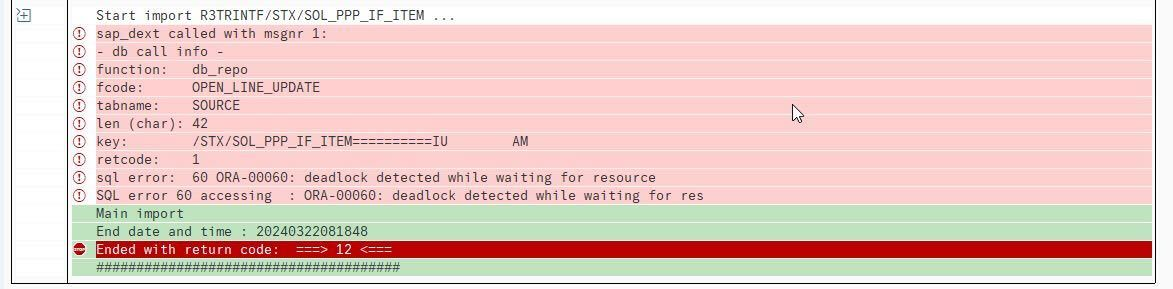
During import of a large transport, the process aborts with return code 12. When checking the import locks, a database / SQL error mentioning a “Deadlock” can be observed.
Reason
When importing data into an SAP system using CTS (which is the case when using SE01 / SE10 / SE09 / STMS), data is copied over from the transport files into the respective database tables using multiple parallel processes.
In some cases, the usage of too many parallel processes during import can lead to deadlock scenarios.
Solution
Solution A: Try Again
In most cases, simply starting the import again will already resolve the issue. Since running into a deadlock scenario requires a very unfortunate flow of events in a certain, specific timing, trying again solves the issue in most cases.
Solution B: Reduce Parallel Processes
If the issue persists after trying to perform the import multiple times, reducing the amount of parallel processes used can resolve the issue. Note that this will noticeably increase the time required to perform the import.
To adjust the respective parameter, following these steps:
-
Open transaction STMS
-
Click the button “System Overview”
-
Double click on the system which acts as a Domain Controller.
- This system will have a special icon in the “Typ” column. Hovering over the icon will display “Domain Controller” as a tooltip.
-
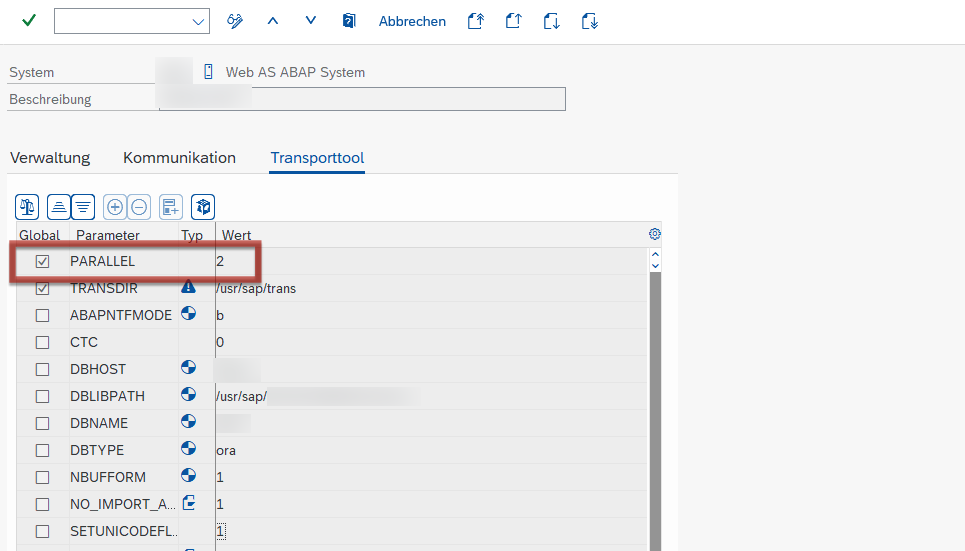
Switch to tab “Transport Tool”
-
Add a new global parameter
PARALLELand set its value to2. -
Save and, if asked, confirm that the change should be distributed to other systems in the landscape.
After the parameter has been changed, start the import again. If it continues to fail, set the parameter to 1. If this does not work either, restart the system (including application server, message server, and database).