Trace an RFC Call in a Co-Deployed System Scenario
The usual way via SICF doesn’t work for co-deployed system scenarios since it will only measure up to the RFC call into backend which results in almost 100% of time spent on the RFC call. This renders the normal method useless.
To trace OData calls in this scenario, go to SAT in the BACKEND system and click the button “Schedule”
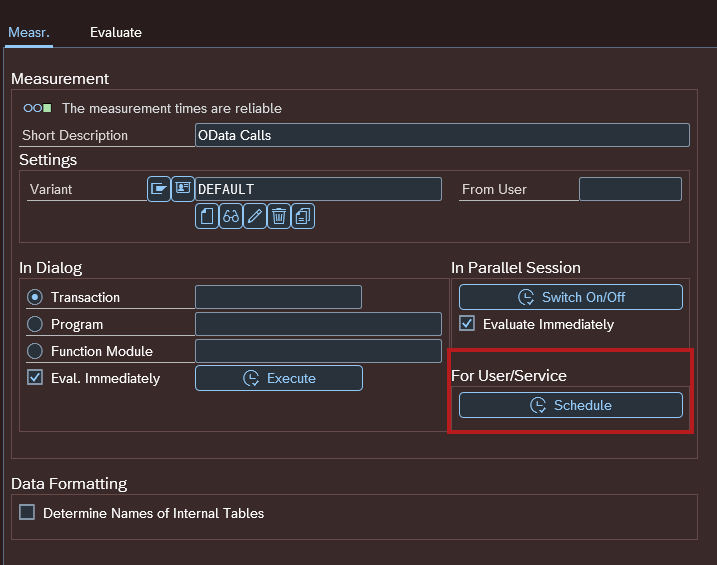
Create a new schedule object via the button in the UI or Shift + F7.
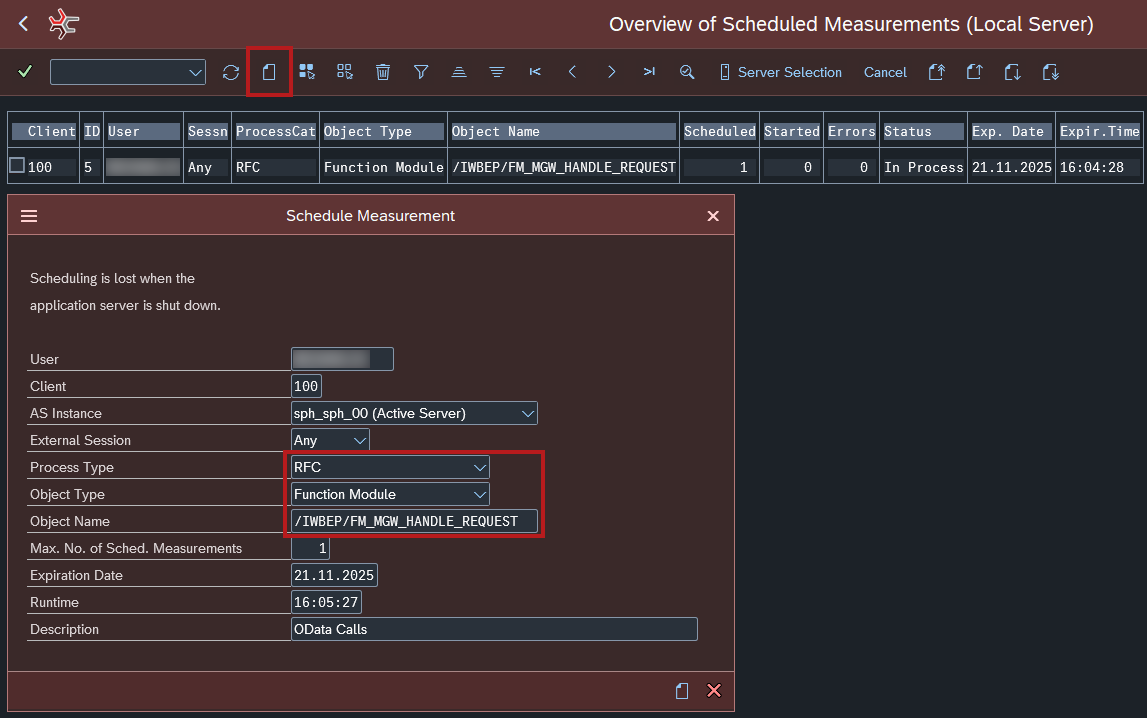
Make sure to use these values:
- Process Type:
RFC - Object Type:
Function Module - Object Name:
/IWBEP/FM_MGW_HANDLE_REQUEST
Everything else can be left on the default values. Check the screenshot above for additional values.
Sadly you can’t turn on measurements for a period of time. With this method you can only turn it on for a given amount specified within “Max No. of Sched. Measurements”. Entering 0 will default back to 1 😞
After you created the schedule object it will appear in the table and will stay on “Scheduled = 1” and “Started = 0”.
You can now execute the request either via GW Client or Frontend.
Afterwards the schedule object will state “Started = 1” and “Status = Executed”

You can now go to the Evaluate tab in SAT and find your request there.
