
Project / Item Creation Result Step Behaviour
Problem
During the Project / Item Creation Wizard, some selection steps may not be displayed in the frontend UI. This can lead users to believe that a step is missing or incorrectly configured because it does not appear in the Creation header or wizard flow.
Additionally, fields in the Creation form marked as Read-Only may not display values, even though values are expected to be filled automatically from the previously selected creation steps by the user.
Environment
Creation Wizard
Reason
This behaviour follows the standard system design.
Skipped selection steps
If a selection step has only one possible option, the system automatically selects it and skips the step.
- The skipped step is not shown in the Creation header.
- This avoids unnecessary steps and keeps the wizard easy to understand.
- The step is therefore not visible in the frontend UI.
Example:
- If the Creation result step contains only one Bucket, the Bucket selection step is skipped automatically.
- If the Creation result step contains multiple Buckets, the selection step is displayed in the wizard so the user can make a choice.
Read-Only fields in the Creation form
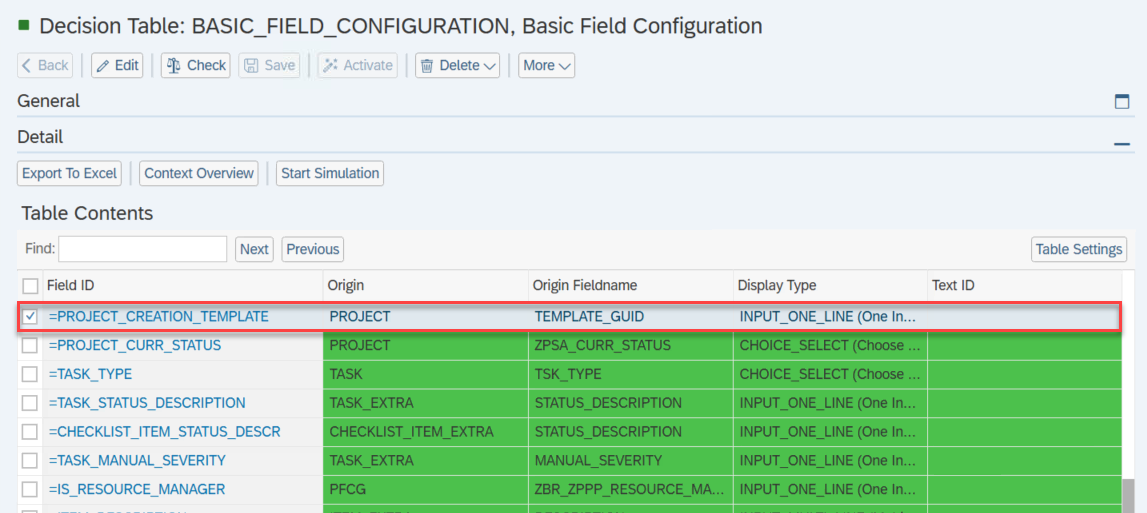
When Creation form fields are marked as Read-Only and for fields such as item type and project template their Origin is set to Item or Project, their values are filled automatically during the creation process.
These values come from the selections made earlier in the Creation Wizard such as the item type and project template.
Example:
Solution
This behaviour is standard and works as designed.
To ensure correct functionality:
- Understand that selection steps with a single result value will be skipped automatically.
2. For Creation form fields that should be filled automatically:
* Set the **Origin** to **Item** or **Project for fields such as Item type, project Template in the creation form**.
See Also
Keywords
project creation, item creation, wizard, result step, skipped step,Project Template, Item Type.