
Size Category When Creating DDIC Tables
If you’re setting up a new DDIC table in SAP, you might be wondering about the Size Category. Let’s simplify it a bit.
DDIC Tables vs. Database Tables:
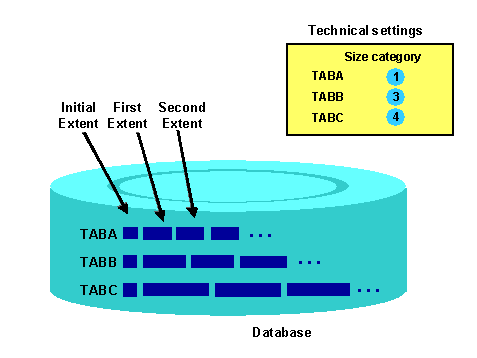
When you create a DDIC table in SE11, a database table is made behind the scenes. Think of the DDIC table as a representation / abstraction layer of the actual database table. Once it’s made, this database table has a predefined size, known as the “Initial Extent”. For most new database tables, this size is consistent. At this stage, the Size Category doesn’t matter yet.
What’s the Deal with Size Category?
When the table reaches the limit of its initial size (Initial Extent), it’ll need more room. That’s where the Size Category steps in. It determines how much extra space is added to the table when required. This additional space is termed “Extent”. Depending on the Size Category, the database will add more or less space to the database table.
What if I Choose the Wrong Size Category?
- Too Small: Picking a low Size Category means your table might run out of space more frequently. The database will need to add space repeatedly, which could lead to slower performance.
- Too Big: On the other hand, if you choose a very high Size Category, the database could reserve more space than needed. This could lead to unused and wasted storage.
To Sum It Up:
Selecting the right Size Category is key for your database tables in SAP. It’s about finding a balance to ensure you’re not using too much or too little space. Checking and adjusting this setting based on your data growth and system requirements from time to time is a smart move.
However: Contrary to popular believe, the size category does not control the “absolut available space” for this table. The table will not be “full” if you choose a too small Size Category.