
Reporting and KPI
Overview
The XCM Analytical report for Change Record Management provides real-time and historical visibility of the Key Performance Indicators for management to act on and improve the process by improving the KPI metrics.
Key Capabilities
Time-based KPI Monitoring: Tracks how long change records spend in each phase of the Change lifecycle and measures on-time completion against expected completion dates. All Time based analytics are computed monthly and always display the last 12 months of data.
Volume: Provides a count of change records grouped by change phase and by change record type.
Rejection and Quality Tracking: Identifies change records that were rejected or manually moved back to a prior status. Calculates a monthly rejection ratio, and supports drill-down by status and phase for root cause analysis.
Customizable Phase Configuration: Phases used for duration and count calculations are configurable. Each phase is defined by a start status and an end status, mapped to standard change record lifecycle status codes, allowing organizations to align analytics with their specific process definitions.
Process Observer Integration: A mapping of status actions to Process Observer tasks is evaluated to enable structured event logging and accurate KPI computation.
KPIs supported in XCM
Duration KPIs
-
On-Time Completion Percentage (OCP): Measures the proportion of change records completed within a given month that were finished on or before their expected completion date. Displayed as a monthly bar chart for the last 12 months.
-
Change Record Count (CRC): Total number of change records for the selected period, broken down by change record type and change reason. Displayed as bar
-
Ongoing CR Count (OCR): Shows the number of change records currently in progress, grouped by record type. Displayed as a bar chart.
-
Rejection Ratio (RR): Measures the proportion of completed change records that experienced a rejection (same status loaded more than once) during their lifecycle. Displayed as a monthly bar chart for the last 12
Count KPIs
-
Change Records by Change Phase: Shows the number of change records associated with each configured phase. Displayed as a Bar chart — one Bar chart per phase.
-
Change Records by Record Type / Change Reason: Shows the number of change records grouped by change record type. Displayed as a Pie chart — one Pie chart per record type.
-
Rejections per Status / Phase: A detailed breakdown of where in the lifecycle rejections are occurring, by individual status code or by configured phase.
Steps to create Process Observer and link to XCM Reporting
- Process Observer (POB) provides the technical foundation for XCM Analytical Reporting. It captures process milestones as they happen, giving the system accurate data for all KPI calculations.
- Process Observer monitors the complete change record lifecycle based on events raised during status transitions.
- Each status transition is mapped to a corresponding POB task, which records precise timestamps for phase start and end events.
- The POB event log serves as the data source for phase duration calculations, rejection detection, and completion date analysis.
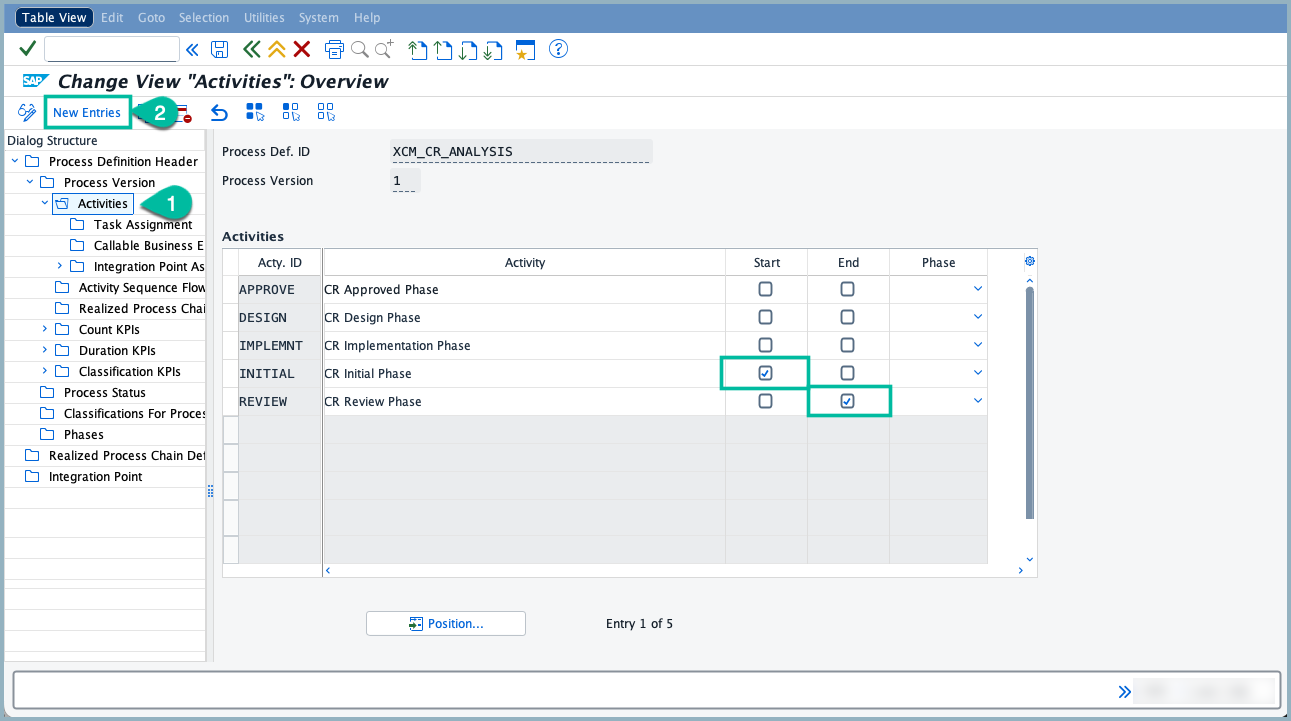
- First, Define the phase you want to link it to the status in the Transaction code - POC_MODEL by check-mark the Start and End indicators.
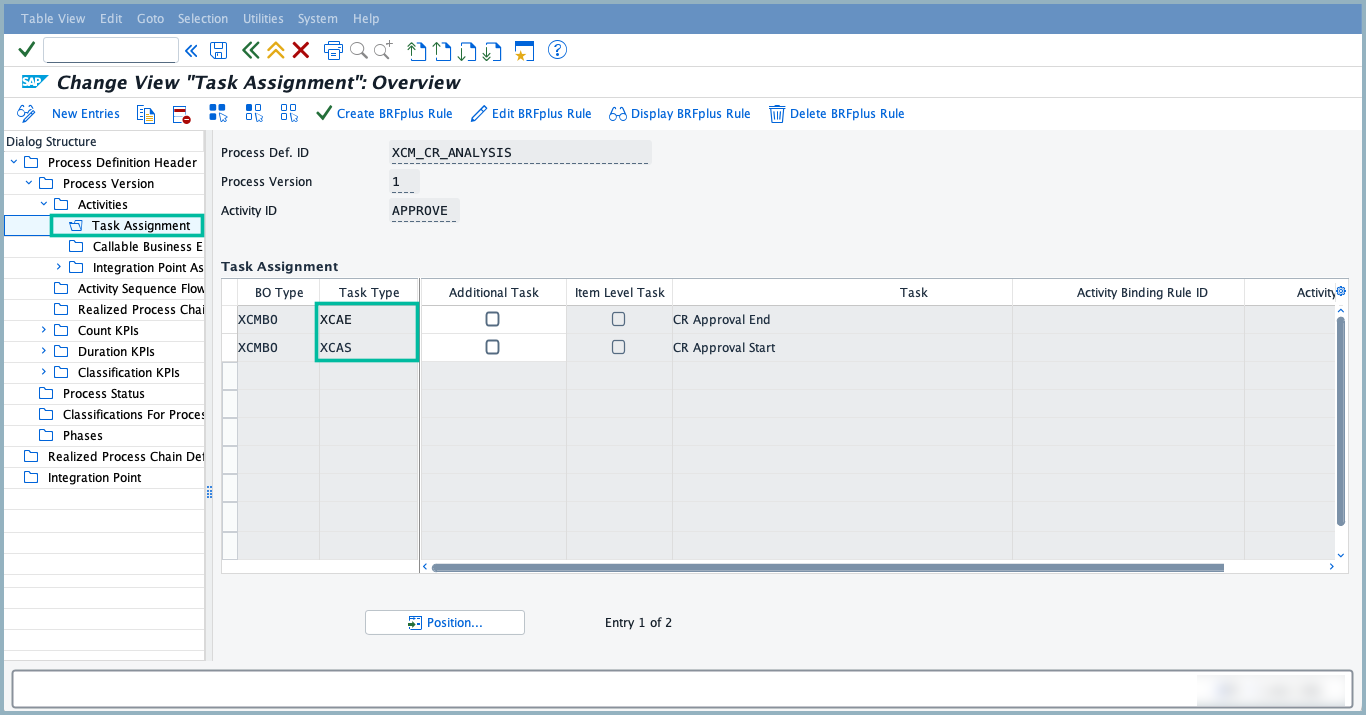
- Once the phases are defined, assign the corresponding Start and End task types to each phase.
-
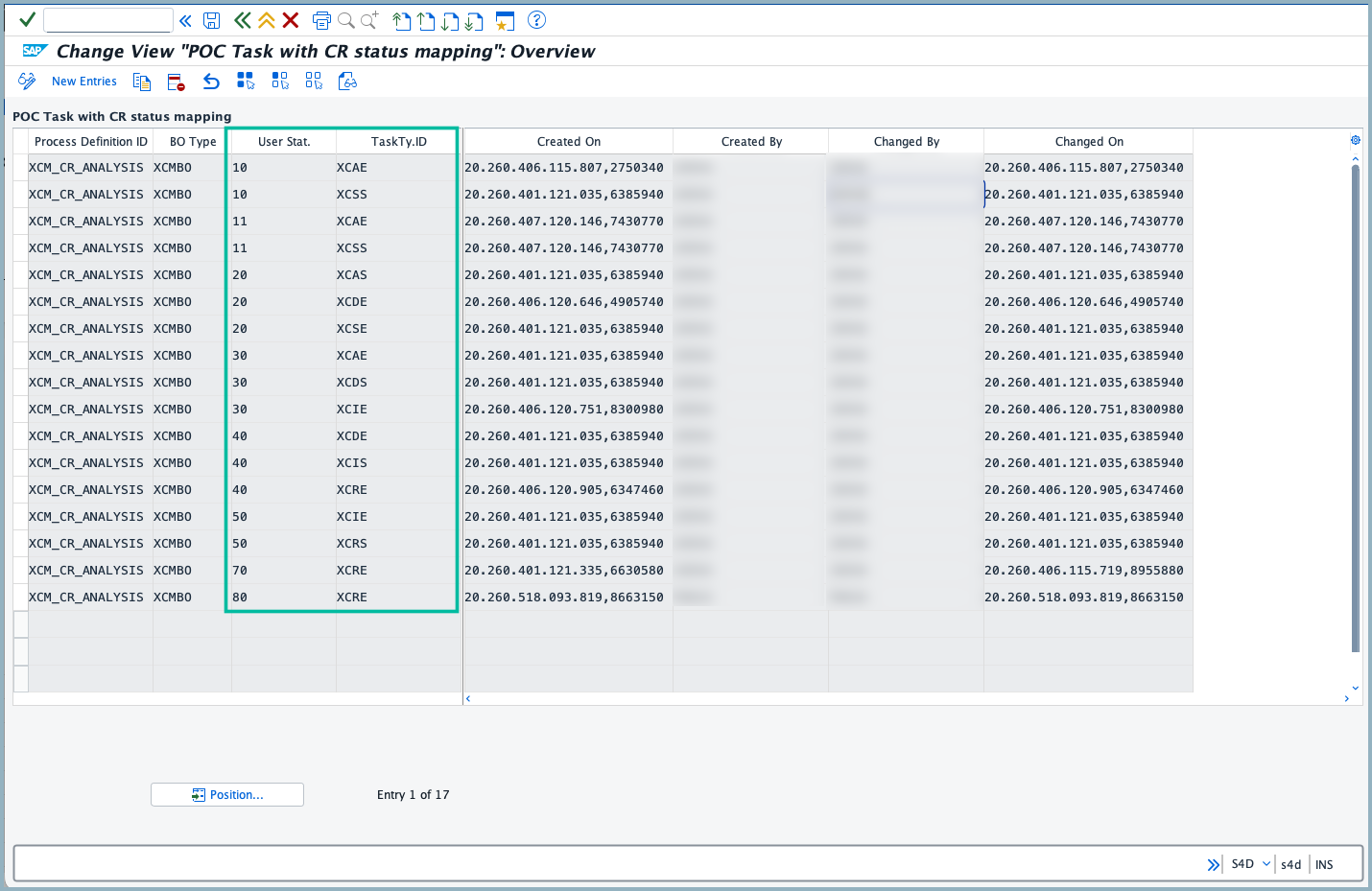
The mapping table requires a Process Definition ID, its corresponding BO Type, a User Status, and the Task Type ID to be assigned.
-
The core mapping rule is:
- For each status, assign two task types: the Start task type of the phase it belongs to, and the End task type of the neighboring phase — either the previous phase (to handle rejections) or the next phase (to handle forward progress).
-
To define the task with CR status mapping below is the path: Transaction /XCM/CUS → XCM Customizing → Analytical customizing for Process Observer → POC task with CR status Mapping
-
Below is the example of Mapping the status to task type:
- Status 10 & 11 (Initial Phase): XCSS (CR Initial Start) marks the beginning of the Initial phase. XCAE (CR Approval End) is assigned as the end marker to handle the rejection scenario. if the CR is rejected at Status 20 (Approval phase) and reverts back to Status 10 (Initial phase), the system must first end the Approval phase by recording XCAE (CR Approval End) before re-entering the Initial phase. This ensures the Approval phase duration is correctly captured even when a rejection occurs.
- Status 20 (Approval Phase): XCAS (CR Approval Start) is the start task of the current phase. The end task types assigned are XCSE (CR Initial End) for the previous phase and XCDE (CR Design End) for the next phase, to handle both the forward transition and the rejection scenario.
-
When a CR is rejected at any status and returns to a previous status, the system must capture both the end of the phase being exited and the start of the phase being re-entered.
Prerequisites
- Create the BO type in the path SPRO → Cross-application components → Process and Tools for Enterprise search → Process observer → Facade layer Content → Maintain objects in Facade Layer
- Create the task type and link the BO type to tasktype created.
- Then Configure all the customization in the POC_MODEL
- Process Definition ID need to be created at the beginning and the corresponding version need to be activated.
- Then navigate to the path Transaction /XCM/CUS → XCM Customizing → Analytical customizing for Process Observer → POC task with CR status Mapping